The UX Design Process: From Discovery to Developer Handoff
What happens between the first project conversation and a design that is ready to build? A practical guide to UX stages, deliverables, and your role along the way.

TL;DR
- Discovery connects user needs with business goals, existing evidence, and technical constraints.
- Flows and wireframes make structure and behaviour easier to discuss before detailed visual design.
- Prototypes help teams explore interactions. Testing with relevant users provides evidence that a stakeholder presentation cannot.
- Developers should contribute before handoff, especially where designs depend on data, integrations, or complex behaviour.
- A useful handoff includes states, responsive rules, content, assets, and decisions—not just access to a design file.
- The process is iterative. Your scope, content readiness, access to users, and decision-making shape the timeline.
A website can look finished while important questions are still open. What happens when someone cannot complete a form? Which information does the team need after it is submitted? And can the developer tell how the design should behave beyond the screen shown in the presentation?
The UX design process helps answer those questions. It moves from understanding a problem to shaping the structure, exploring interactions, testing ideas, and preparing the details needed to build them. For a client, the useful part is knowing what each stage should resolve—and where your input makes a difference.
A real project: when a website refresh reaches beyond the website
Goway came to Flair with a new name and visual identity already in place. The website needed to reflect the brand and make car-financing information easier to navigate. The work also expanded into the application infrastructure, including flows for private customers, businesses, and partners.
That gives this guide a concrete context: customers need a clear way to explore options and apply, while the team receiving the application needs useful information. Both sides matter. The sections below explain the decisions and deliverables involved in addressing a challenge like this; they are not a record of every workshop or test carried out on Goway.
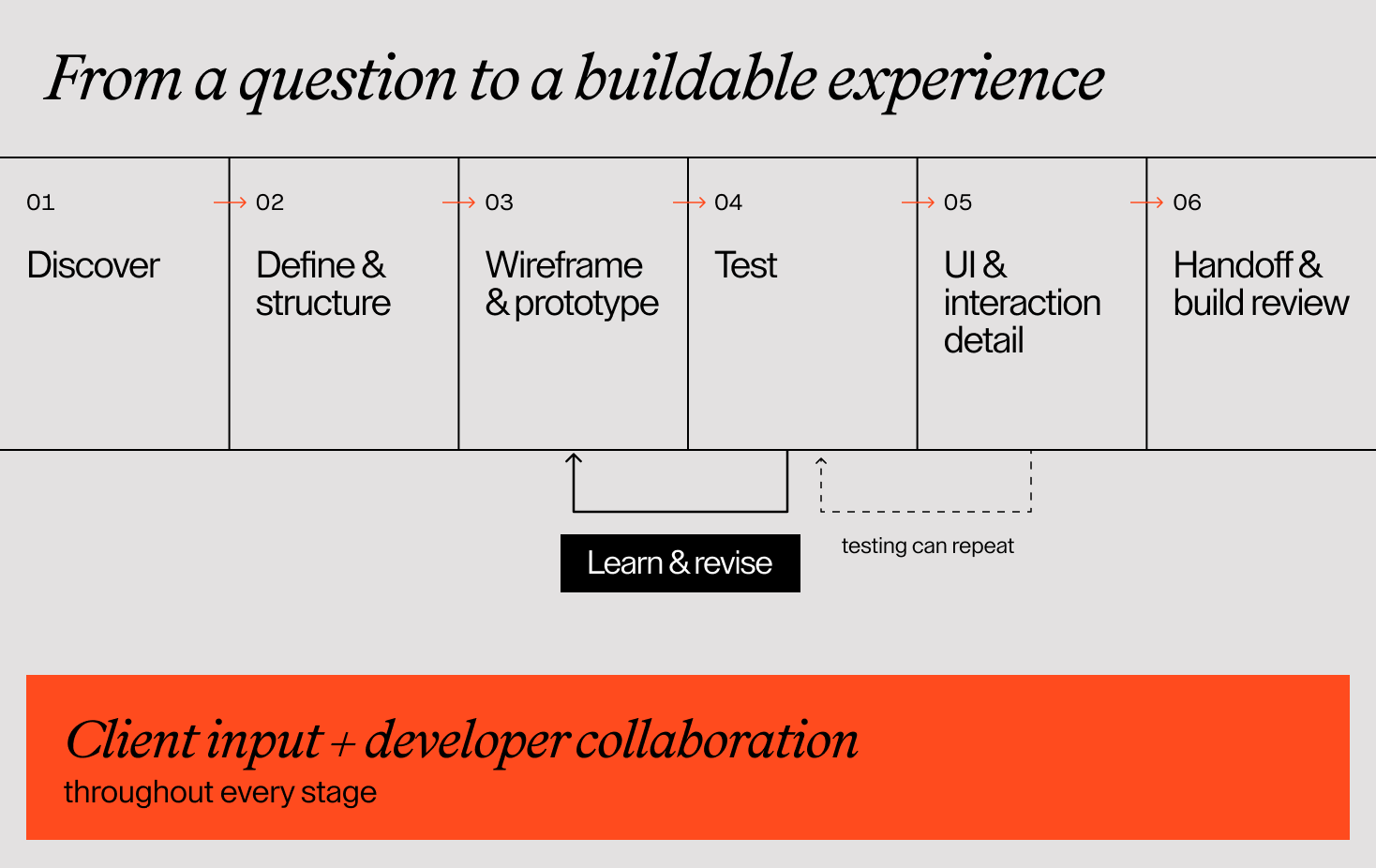
The UX design process steps at a glance
There is no single set of deliverables that every project needs. A focused website improvement and a complex digital service call for different depth. These stages provide a practical way to discuss the work with your design partner.
| Stage | What it should clarify | What you may review |
|---|---|---|
| Discovery | What do people need, and what is getting in their way? | Evidence summary, open questions, constraints |
| Definition and structure | Which problems and journeys come first? | Priorities, sitemap, user flows |
| Wireframes and prototypes | How should the experience work? | Page structure and interactive journeys |
| Testing and iteration | Can people understand and complete the task? | Observations, issues, revised designs |
| UI and interaction detail | How should the experience look and behave consistently? | Responsive screens, components, states |
| Handoff and build review | Can the team implement and check the intended experience? | Specifications, assets, acceptance criteria |
The Design Council’s framework also treats design as an iterative process. New evidence can send the team back to an earlier decision. The stages below are a working structure, not a one-way approval chain.
Discovery: understand the task before designing the screen
Discovery starts with what people are trying to achieve and what the business needs to support. Existing analytics, support questions, stakeholder conversations, user interviews, and a review of the current experience can all contribute. Choose methods to answer the project’s open questions; do not treat every research activity as compulsory.
For an application journey, useful questions include what customers need to know before starting, what information they can reasonably provide, and what the receiving team needs to act on. Technical constraints belong in this conversation too. A flow that depends on unavailable data will need a different solution.
What you review: a clear summary of the problem, evidence, assumptions, constraints, and gaps that still need investigation.
Your role: explain how the business works, share existing evidence, and help the team reach relevant users or colleagues. Be clear about the desired outcome. “Make it easier to complete an application” is a more useful starting point than “make the form modern”.
Definition and structure: agree what comes first
The next step is turning what the team has learned into priorities. Which audience and task should the project support first? What belongs in the initial release? What needs more investigation?
A sitemap organises pages and content. A user flow shows the steps someone takes to complete a task, including decisions and alternative paths. They answer different questions, so a navigation menu alone is not enough to describe an application journey.
Goway’s project included separate application flows for private customers, businesses, and partners. That distinction illustrates why audience differences need to be considered in the structure, rather than left for the final wording of a form.
What you review: the proposed sitemap, priority journeys, and boundaries of the agreed scope.
Your role: confirm service names, business rules, and who needs which information. Identify a person who can resolve conflicting feedback. Approving structure means agreeing how the experience should work, not signing off on colours or typography.
Wireframes and prototypes: make the journey tangible
Wireframes show what belongs on a screen and how information is prioritised. They can be deliberately simple, allowing the team to discuss content and sequence without getting pulled into visual polish.
A prototype connects screens or states so an interaction can be explored. It may cover only the part of the experience that needs checking. It is not necessarily a working product, and its simulated behaviour should be clear to everyone reviewing it.
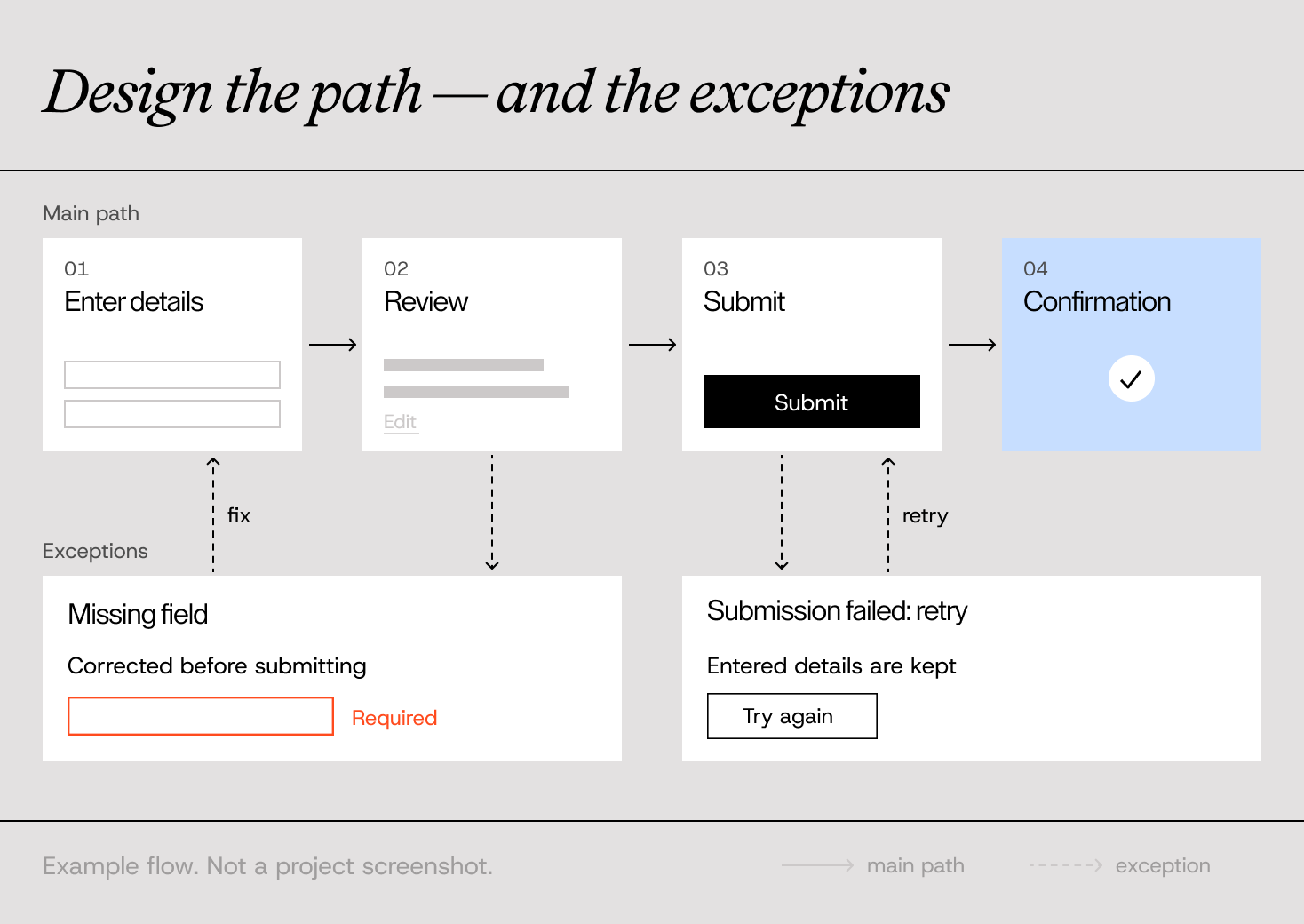
For an application flow, this is a useful point to ask what happens when a field is missing, a customer needs to go back, or a submission fails. The example below illustrates those questions; it is not a reproduction of Goway’s form.
What you review: layouts with realistic content and a prototype of the important journey, where useful.
Your role: check whether the sequence reflects the actual service and whether the content is accurate. Assign responsibility for copy early. Final wording can reveal requirements that placeholder text hides.
Have a project in mind?
Let’s talk
Contact us
Testing and iteration: look at what people do
A presentation can confirm that stakeholders understand a proposal. Usability testing asks a different question: can relevant users complete a realistic task with it?
In a session, participants attempt tasks while the researcher observes where they hesitate, misunderstand, or get stuck. Nielsen Norman Group’s guidance recommends realistic task scenarios that do not give away how to use the interface. For an application prototype, that could mean asking someone to start an enquiry for their situation, rather than telling them which button to press.
Findings should lead to decisions: what needs changing, why it matters, and what should be checked again. A prototype may reveal that the structure needs work, not just the wording of a button. Agree the depth of testing in the scope; internal reviews and tests with target users are different sources of feedback.
What you review: prioritised issues, supporting observations, revisions, and any remaining uncertainty.
Your role: help arrange appropriate participants where needed, observe without guiding their answers, and make room for changes supported by evidence.
UI and interaction detail: make the design consistent
Visual design brings the brand, hierarchy, and interaction patterns together. Reusable components can keep forms, buttons, navigation, and feedback consistent. Responsive layouts explain how the experience adapts across screens.
The detail matters: focus states, validation messages, loading feedback, empty states, and confirmation text all affect usability. For Goway, the documented outcome included bringing the existing identity into the website across desktop and mobile. That is a useful reminder that brand expression has to work within the experience people use.
Accessibility should be considered throughout the work. W3C recommends evaluating early and throughout development; a visual mockup alone cannot establish how an implemented website will work with assistive technology.
What you review: representative screens, reusable components, relevant states, responsive behaviour, and content ready for implementation.
Your role: confirm the brand direction and content while keeping feedback connected to user tasks. Developers should already be checking feasibility and behaviour with designers.
Developer handoff: make the decisions buildable
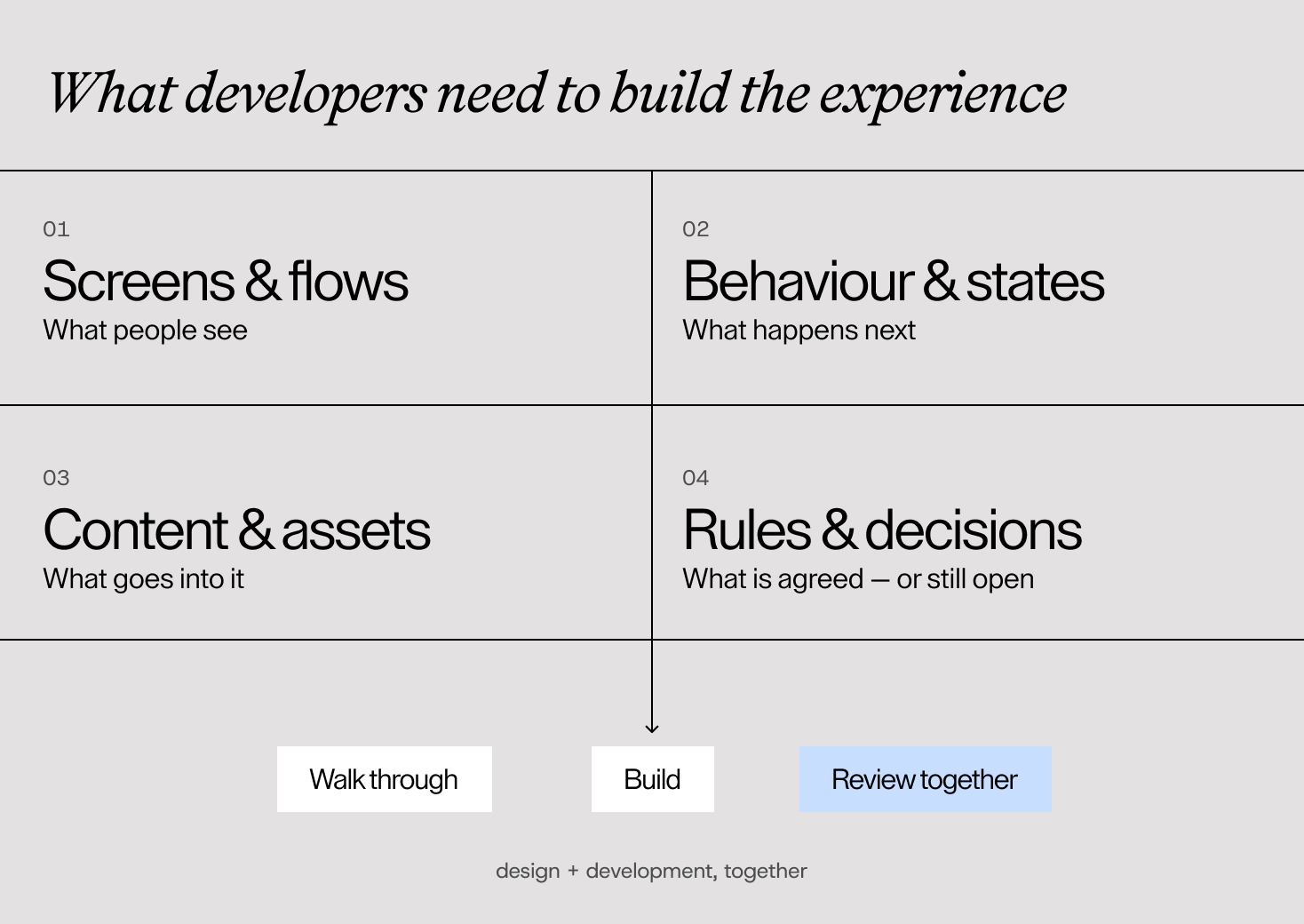
Handoff is where the agreed design becomes clear enough to implement. A well-organised file helps, but developers also need to understand what happens between screens and under less tidy conditions.
For a journey like the one described in the Goway case, the visible form is connected to how application information is received and managed. As a general handoff requirement, the team should therefore clarify data requirements and system responses alongside the interface. That does not mean documenting every detail in the same tool; it means making the source of each decision easy to find.
A useful handoff can include:
- Agreed flows and screens, with status and version clearly marked.
- Components, visual styles, and reusable design rules.
- Responsive behaviour and important interaction states.
- Approved copy, assets, and export requirements.
- Notes on validation, accessibility, and relevant system behaviour.
- Acceptance criteria, open questions, and named owners for decisions.
Walk through the material together. If something changes during development, update the agreed reference and communicate the change. Include design review of the build in the scope so the team can check the implemented experience, not just the original design.
What shapes the UX project timeline?
A useful UX project timeline shows dependencies as well as design work. Access to users, the number of audiences and journeys, technical investigation, content readiness, and stakeholder availability can all change the plan.
Ask for review points and explain who can make decisions at each one. Some work can overlap: developers can assess a proposed interaction while designers explore layouts, and content can be refined alongside wireframes. Other work depends on an earlier decision. Detailed screens for a journey that is still changing are likely to need revision.
Before starting, agree who provides evidence, who owns content, who consolidates feedback, and who approves the scope. Also agree how new requirements are assessed. A timeline becomes more useful when both sides can see what they need to contribute to keep the work moving.
A process that makes the next decision clearer
The user experience design process gives each stage a purpose: understand the problem, agree the structure, explore the interaction, check it, and make the decisions clear enough to build.
Goway shows how a website brief can reach into the service behind the screen. For prospective clients, the practical lesson is to look at the full task and the people involved—not only the pages in the design presentation.
Have a website or product journey that needs rethinking? Tell us what people are trying to do and where things get difficult. That gives us a useful place to start.
FAQ